

My Electricity Bill - Overview
My Electricity Bill page is the one page you need to understand and analyse your electricity bill. On the page there are tools to track your current bill, check if your most recent bill is correct and understand how your bill is broken down. Some quick tips can be found in How to track and verify your electricity bill but you can se below for a full description.
Overview Cards
Section titled “Overview Cards”The Expected Total card at the top of the page gives the total billing amount for the time period selected. This include electricity costs, services charges and solar feed in credits - which are all shown in detail in the cards below.
On this card you can also change the time period that the bill total applies to by:
- Using the dropdown to select the current Day, Week, Month or Year or,
- Clicking on the calendar to choose a custom date range. Your first click on the calendar sets the start date, and the second click on the calendar sets the end date
The time period selected applies to the Expected Total card and all the Costs and Credits cards below it. You should notice the time periods change on all the cards. By default, the current month is selected when you load the page.
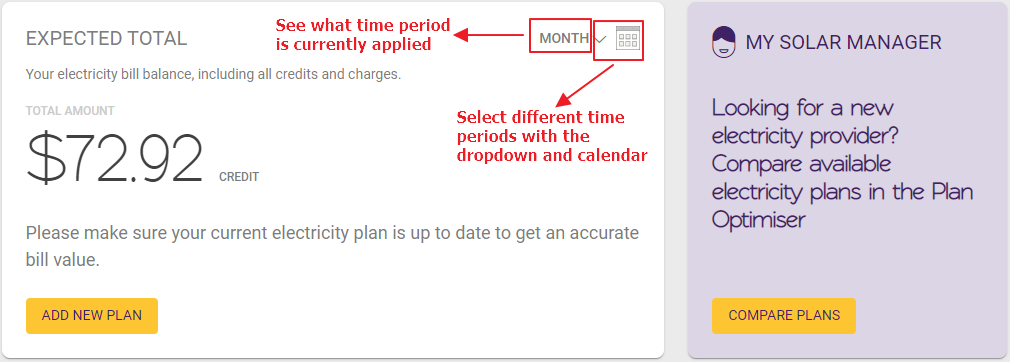
Additionally, the My Solar Manager card is there to give advice on how you can get more from your solar. In this example, it is linking to our new Plan Optimiser page which gives advice on the best plans for you.
Costs and Credits Cards
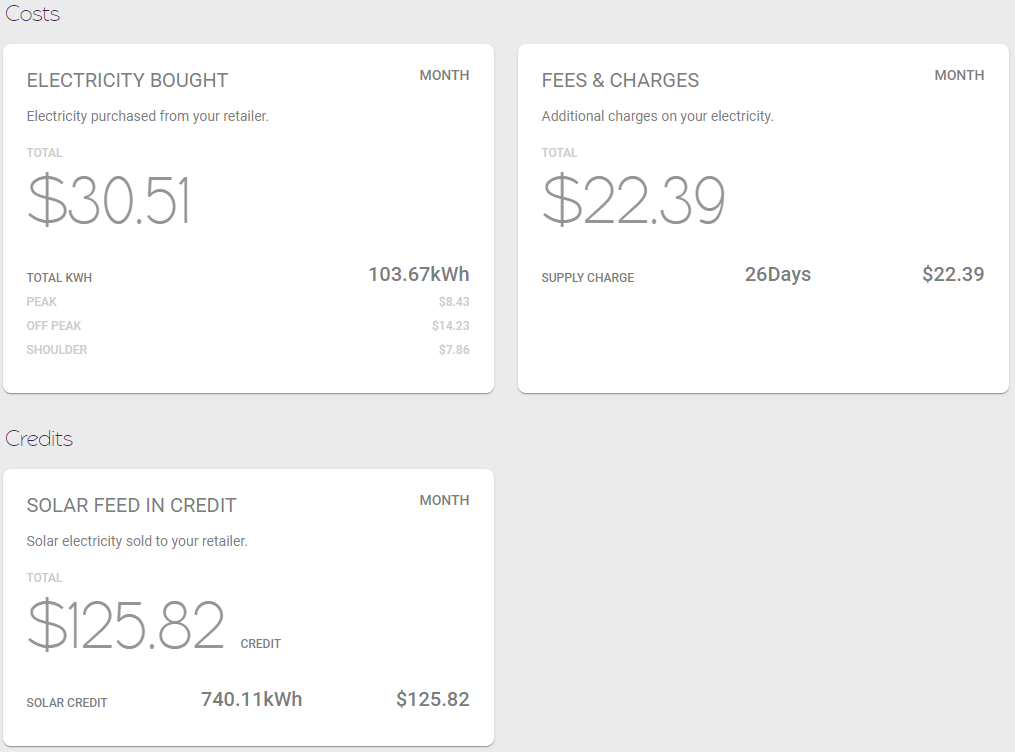
Section titled “Costs and Credits Cards”The Costs and Credits cards show the breakdown of the Expected Total. These values always relate to the same time period as the Expected Total card and when you add the total in each card together (taking any CREDIT values as negative) you will get the Expected Total value.
The Electricity Bought cards shows how much you are charged for the amount of electricity you buy from the grid. In this card you will also see the total energy you have bought and the breakdown of peak, shoulder and off-peak if you have a time of use tariff.
The Fees & Charges card shows any additional costs that do not relate to the amount of energy you use. The most common is a daily Supply Charge. We show both the number of days and the total cost in the card.
The Solar Feed In Credit card shows you how much money you make from selling electricity into the grid. This value should always be a credit. For further understanding, we also show how much energy you sold into the grid in kWh.
As we continue to improve this page, we will be adding more values and cards to cover a larger range of tariffs.
My Electricity Plans
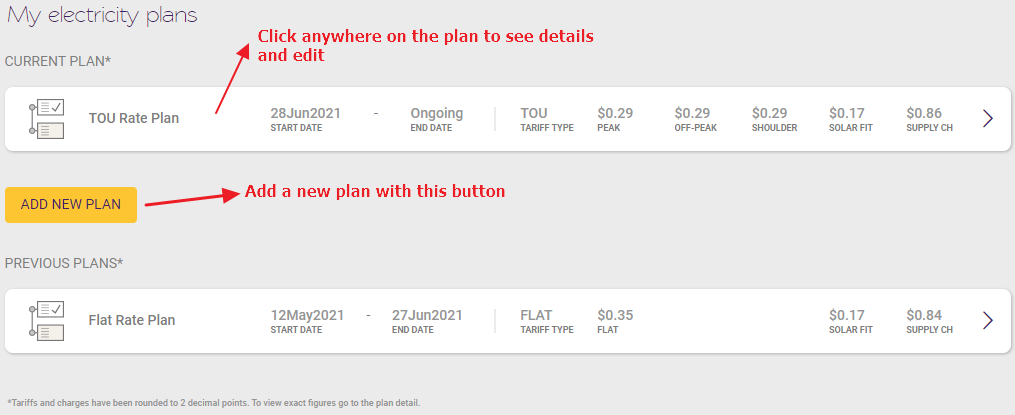
Section titled “My Electricity Plans”The My Electricity Plans section shows your current plans and any historical plans that you have entered into your account. Some overview details of each plan are shown, but more details can be seen by clicking through to the plan details.
If you are a first time user, you will see an example plan which should be changed so you can get accurate values in the rest of the My Electricity Bill page.
If you change plans or electricity providers, be sure to add a new plan via the Add New Plan button. More information on this process can be seen in How to add/edit an electricity plan.
If your data holder is eligible for CDR, please check here