

Configuration Issue - How to troubleshoot a 'Configuration' issue?
A ‘Configuration Issue’ message appears when your solar energy system details or monitoring details were not entered into the database correctly.
To find out more about its causes, please check our ‘What causes a configuration issue?’ article.
Note: This issue does NOT affect your system generation in any way and is only affecting our algorithm ability to inform how your system is truly performing.
To troubleshoot this issue, please follow the steps below:
- Please visit your ‘My Site’ page and ensure that you have the correct system details registered as provided by your solar retailer. For more details on how to update or what each of the fields means, please visit How to update your Solar Energy System Details on the dashboard?
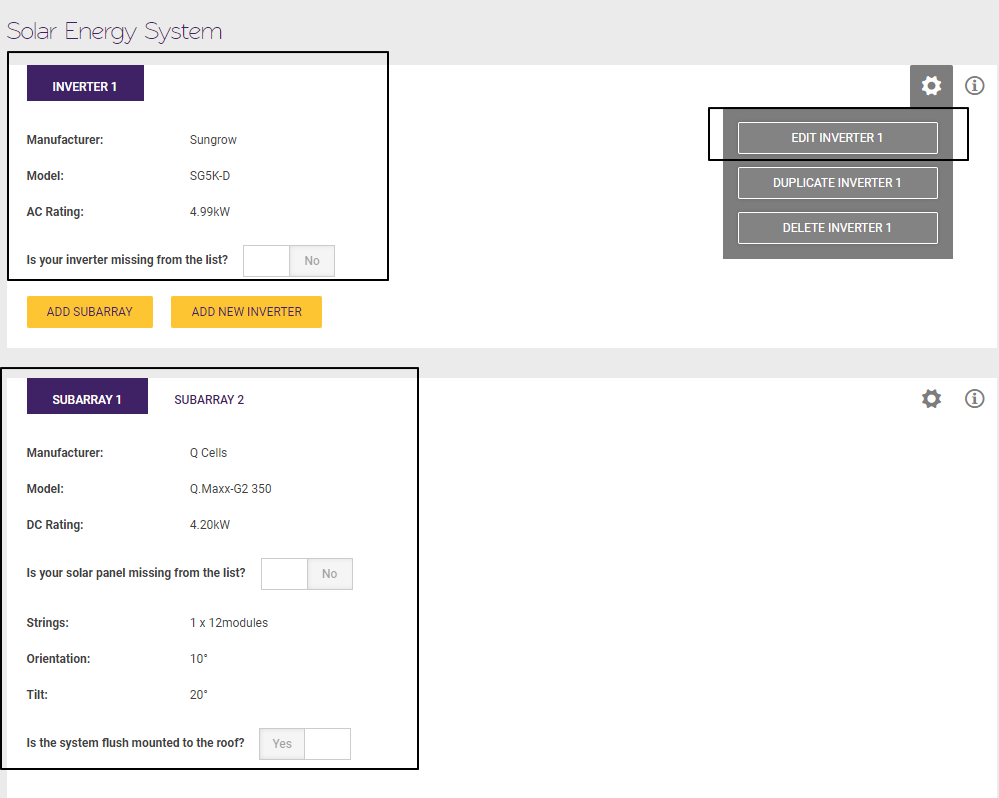
Notes:
If you have a micro-inverter, they will be entered as multiple separate inverters (i.e 1 panel = 1 inverter) or as one inverter with the total AC capacity.
If it is an Inverter API integration site, then only panel details could be edited.
- If you’ve made any updates to the system details above, it will generally take up to 24 hours for our algorithm to re-calculate the performance once applied.
- If the details are correct already, it is likely to be caused by either incorrect monitoring device details or a monitoring device installation issue (please ignore this on an Inverter API integration site).
Please click on ‘Contact Us’ below or reply to the alert email from Solar Analytics, and one of our support team will get back to you shortly.