

How to update your Solar Energy System Details on the dashboard?
Your Solar System information is typically manually entered in by your Solar Analytics Retailer or Installer, however, there can be occasional entry errors, or there are details about your system that they do not know about.
Therefore, confirming your Solar Energy System details on the Dashboard is an important step to ensure we are able to calculate your system’s expected production and performance accurately.
To check and update your Solar Energy System details entries, please visit section *‘Solar Energy System’*on ‘My Site’ page of the Dashboard.
We encourage you to read on further for instructions on how to update you System details outlined below.
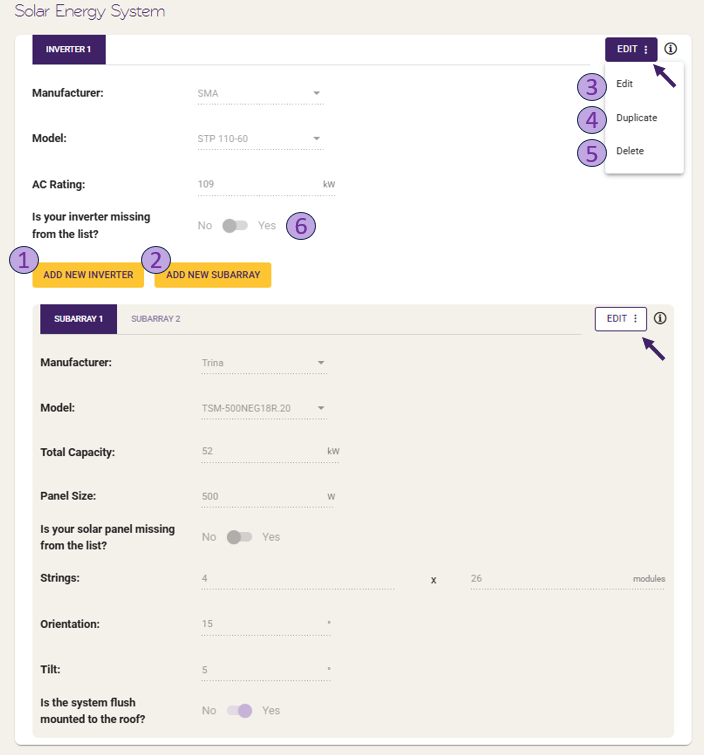
Notes:
- For more information on what each fields means, please click on the ‘i’ icon next to the field name
- For an Inverter API integration site, only the panel/subarray details could be edited. Inverter details will be automatically pulled from the Inverter API calls.
-
Add New Inverter
-
Each inverter you own refers to 1 solar system. This means if you have 2 inverters, you have 2 solar systems.
If you have additional solar system that is missing in the Dashboard system details, then you can add in the information by clicking on ‘ADD NEW INVERTER’.
-
-
Add New Subarray
- Subarray refers to the solar panels within the subarray of your solar system that is attached to your inverter. Note: If you have multiple solar systems on site (i.e. multiple inverters), then please ensure the panel subarray details entered on the Dashboard is linked to the correct inverter details.
-
Update Inverter / Subarray
If you would like to update any of the existing inverter or subarray details, you can click on Settings
 icon located at the top right corner of the section, then ‘Edit’ to adjust the details appropriately.
Notes:
- Subarray orientation is based on a 360 degree scale. You can enter any value between 0 and 360 degrees. For example, if your system faces due North you should enter 0, East is 90, South is 180, and West is 270.
- Subarray tilt will typically match the pitch of your roof (unless your system was installed with special tilt frames). Typical roof pitches range between 15 and 30 degrees.
-
Duplicate Inverter / Subarray
- If you have multiple of the same inverter and/or subarray on site, click on Settings icon located at the top right corner of the section, then ‘Duplicate’ to duplicate the current system details that you have there.
- Notes:
- If you duplicate an inverter with subarray details attached, then it will also duplicate the subarray attached it.
- You can only duplicate one inverter/subarray at a time.
- Notes:
- If you have multiple of the same inverter and/or subarray on site, click on Settings
-
Delete Inverter / Subarray
- If there are inverter or subarray entries you want to remove, click on Settings icon located at the top right corner of the section, then ‘Delete’ to remove them from the list.
- Note: No or Zero inverters or subarrays entries are invalid. Therefore, please ensure you have entered in all the details correctly.
- If there are inverter or subarray entries you want to remove, click on Settings
-
Missing Inverter / Panel Model
- If you are unable to locate the inverter or panel brand/model in the drop down selection list, then click on either: ‘Is your inverter missing from the list?’ or ‘Is your solar panel missing from the list?’, and it will enable you to manually enter the brand and model details.