

Integrated+ FAQ
Solar Analytics’ Integrated+ provides solar and energy monitoring with no additional equipment required. CDR (Consumer Data Right) allows us to obtain your energy usage data directly from your retailer, with your permission.
Below are some frequently asked questions (or click one of the topics below to jump straight to it).
Eligibility for CDR
Section titled “Eligibility for CDR”Am I eligible for CDR?
You’re eligible, as long as you:
- Have a wi-fi enabled Fronius, Sungrow, Goodwe, GE or LG inverter
- Live in one of the states in the National Electricity Market (NEM) - so that’s Queensland, New South Wales, Australian Capital Territory, Victoria, Tasmania and South Australia
- Are with a supported energy retailer. Check out the latest list here.
What if I’m using Integrated+ and I switch away from a supported retailer?
Your consumption data will be deleted and you’ll revert to a limited feature set - you’ll still be able to see your solar production and performance, and be alerted if your solar system is underperforming. This means you’ll lose access to your solar savings, electricity bill tracking, plan comparison tool and battery calculator.
What if I’m using Integrated+ and I get a new electricity meter installed?
You’ll need to revoke and re-grant permission to share consumption data once you have your new meter installed.
To do that you’ll need to go to Settings>My Site (https://my.solaranalytics.com/my-site/), scroll right down to the bottom and hit the ‘Manage your consent here’ button. A new tab will open up, and you’ll need to hit the bin icon next to your current permission. Your site will then revert to production-only and you’ll have the option to add your consent again on your Dashboard homepage (you can see the button just under the ‘where’s my consumption data’ modal below).
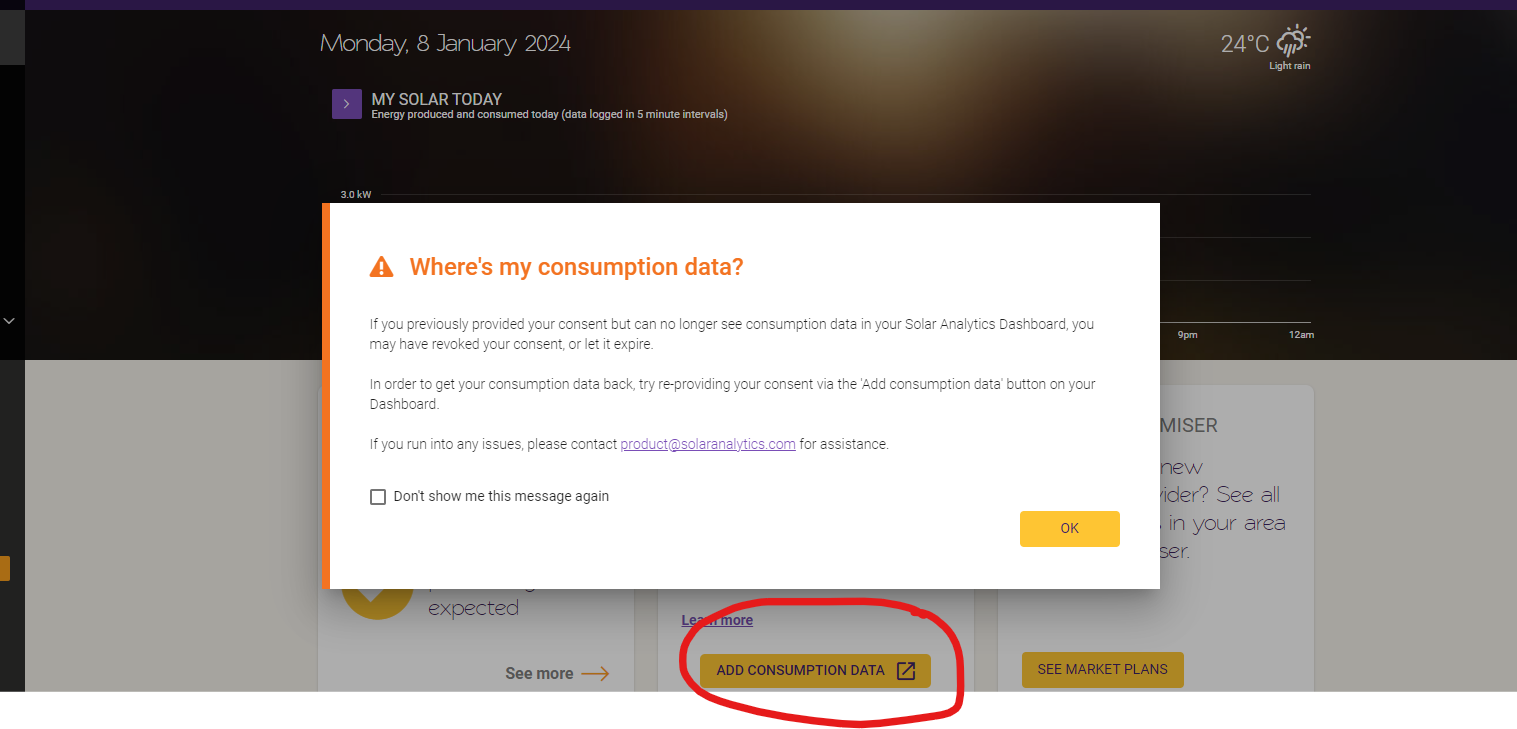
What about sites with hybrid inverters, or batteries?
- Hybrid inverters should ideally have energy meters already, so you should be able to use our regular Integrated product
- AC-coupled batteries are not supported. If you have an AC-coupled battery and add your consent for CDR, you’ll see ‘negative consumption’ data on the dashboard. This is because AC-coupled batteries are not communicating with the inverter, and not sending information about battery charge, discharge or consumption to Solar Analytics. Hence we won’t get the full picture of energy usage on the site. This will also result in inaccuracy in savings, battery calculator and plan recommendations.
- For sites with AC-coupled batteries, Solar Analytics’ Classic product with a Wattwatchers smart monitor will be the best solution - ask your solar installer to provide a quote.
- Sites with DC-coupled batteries will be able to get consumption via our standard Integrated product
Managing consent
Section titled “Managing consent”How can I grant consent?
- Once your site has been set up and you have access, navigate to the Dashboard section and locate the “My Energy Usage Card”. Within this card, you will find an “Add Consumption Data” button.
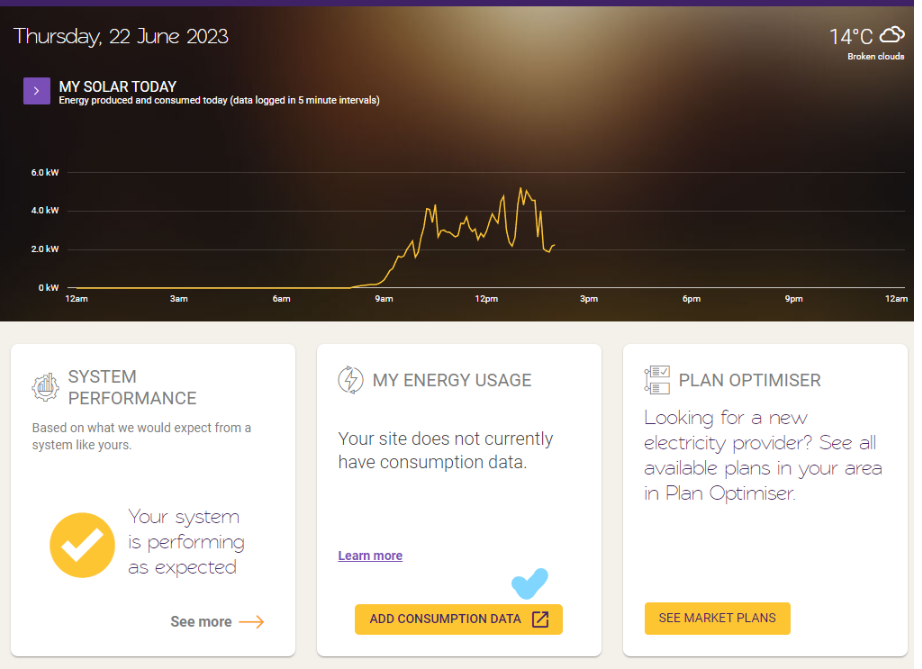
- Follow the consent prompts by providing the email that you use to log into your energy retailer
- You will receive a one-time passcode
- Click Authorise when all is completed and reviewed and you will be redirected back to the Solar Analytics Dashboard
- It will take approximately ten minutes for your consumption data to appear on your Dashboard
One-time passcode does not work during consent flow step
- Make sure you are logging to your Retailer Portal with your email that is a primary account holder
- If you are a secondary account holder, it is the rule that the primary account holder requires to provide permission to the secondary account holder. This can be done through the EA Customer preferences.
- Try typing the code instead of copy/pasting to avoid copying over an additional space character. If this doesn’t work
- If this still doesn’t work, please send us an email:
- Screenshot of the error
- Inform us which email you are using for the Retailer Portal and confirm that it is the primary account holder, please specify the email as well.
Why can’t I proceed with the consent flow?
Ensure that all fields listed on the consent page are selected, so you can proceed onto the next step.
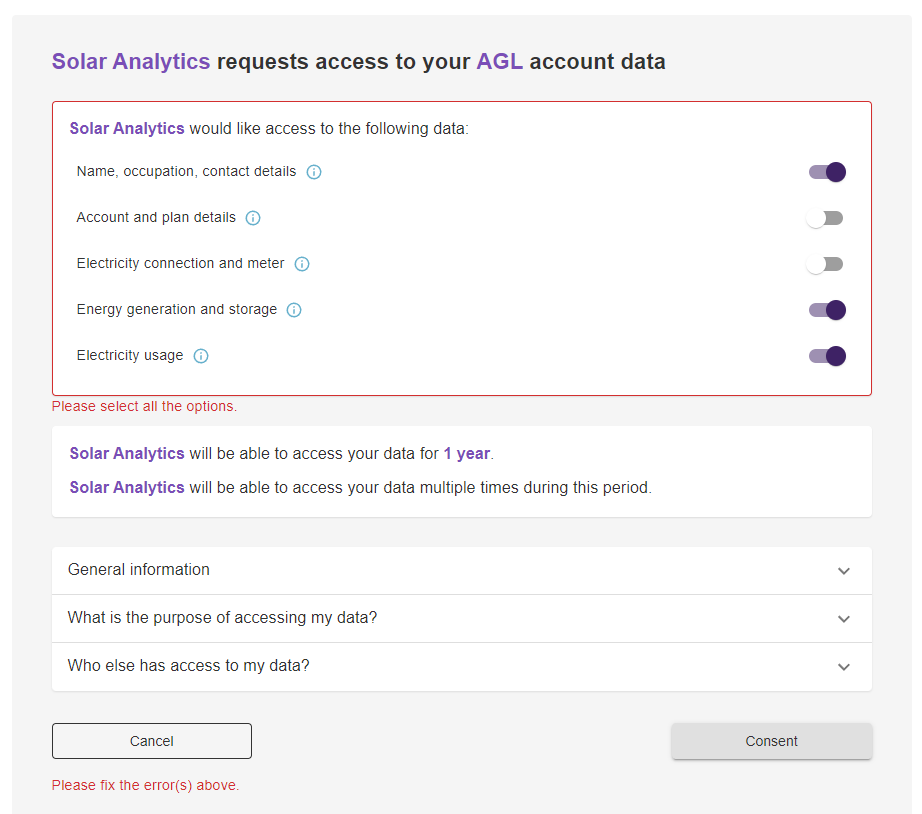
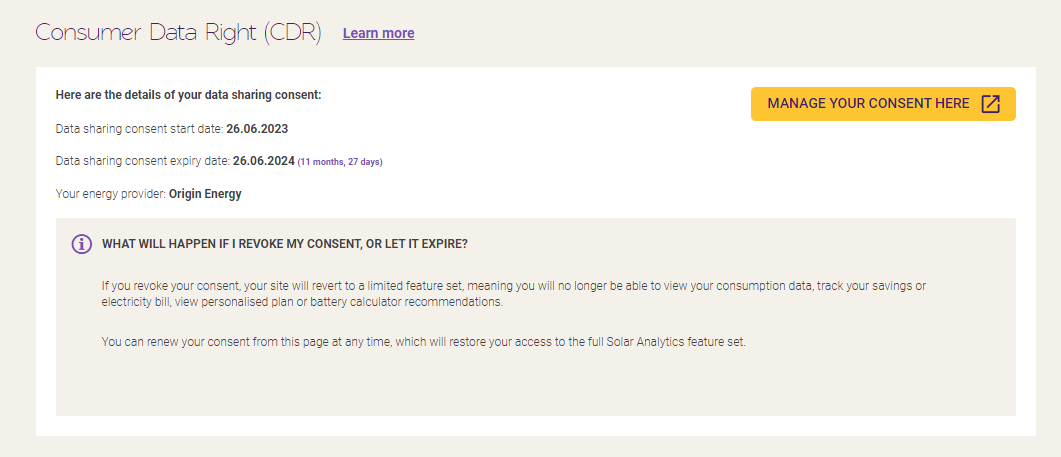
What happens when you revoke your consent or let it expire?
If you revoke their consent, the site will revert to a limited feature set, meaning consumption data will not be available. You will no longer have access to solar savings, electricity bill, Plan Optimiser and battery calculator recommendations.
Your consent will last a year, and you’ll receive prompts to renew when it’s approaching expiry. You can also renew your consent at any time by logging into your Dashboard and going to My Site under Settings and then scrolling down to ‘Manage your consent here’.
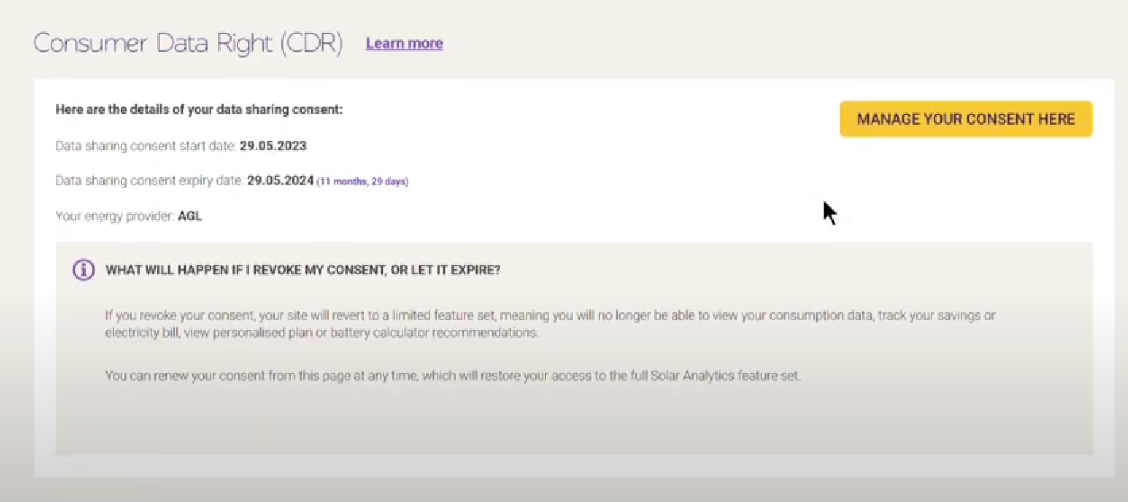
How long will Solar Analytics be able to access data?
- Solar Analytics will be able to access your data for 1 year.
- Solar Analytics will be able to access your data multiple times during this period.
Consumption data
Section titled “Consumption data”When can I see my consumption data?
- Consumption data will be available 10 minutes after consent has been granted.
- You’ll get up to 90 days of historical consumption data in your Dashboard after you grant consent
Why is my consumption data always a day late?
The electricity provider provides consumption data one day behind.
Why can’t my solar installer/partner/dad see any consumption data when they log into my Solar Analytics Dashboard?
The Consumer Data Right (CDR) Rules only allow access to your data for the electricity account holder. Solar Analytics are unable to provide access for secondary site owners or for your solar installer. More information on data privacy here: Your rights | Consumer Data Right.
Why can I see a step pattern graph for their consumption?
This can happen when the energy retailer sends us data with a 30-minute resolution. More commonly though (80% of sites so far) energy retailers are providing 5-minute resolution for consumption data.
- Ensure that electricity meter is not a Basic, accumulation or Type 6 meter as a Type 6 meters are read manually not autonomously and we are not able to receive consumption data. Example of meter is the EM1000 Energex.
- You are able to check with your energy retailer if they will upgrade the electricity meter that is compatible with CDR.
Why is my consumption data showing negative?
Large amounts of ‘negative consumption’ can be caused by an AC-coupled battery or another power source that isn’t ‘talking’ to your inverter so that we (Solar Analytics) don’t know about it. If it’s just intermittent spikes, it may be due to a slight mismatch in the timestamps on your solar production and your energy consumption data.
Why are there small negative spikes in consumption data on the dashboard?

Those small spikes in consumption data are generally just when the timestamps of the CDR consumption data do not quite line up with the timestamps for the production data we’re getting from your inverter - looks a bit odd but the totals are still correct. Please check the total on the dashboard against your electricity bill.
I made someone else the primary site owner for my site - why can’t I see consumption data anymore?
Only the primary site owner will be able to view consumption data via CDR.
How do I stop sharing consumption data?
Follow the steps to revoke your data by logging into your Dashboard, going to Settings and then My Site and scrolling down to revoke your data.
Business accounts
Section titled “Business accounts”If your Solar Analytics site is the site of a business, you may need to register a Nominated Representative for the electricity account with your electricity retailer so that person can consent to data sharing so we can get your energy data from your retailer.
A Nominated Representative must be at least 18 years old and have a login for the Solar Analytics’ site.
How do I register as a Nominated Representative?
Note: if your energy retailer isn’t listed in the table below, they may not be set up to handle business accounts yet. We expect the majority of retailers available via CDR will be able to handle business accounts by May 2024.
| AGL | Energy Australia | Origin | |
| Released Date | 15 Nov 2023 | 15 May 2023 | 15 May 2023 |
| Steps to nominate | Fill out this form on the AGL website: https://www.agl.com.au/help-support/energy/manage-your-account/account-registration-and-logins/manage-consumer-data-right/cdr-nominated-representative-form | Please contact EA on 1800 146 749. Or send an email to enq@energyaustralia.com.au | Please contact Origin directly and they will add the Nominated Representative as a contact, in accordance with their CDR policy https://www.originenergy.com.au/wp-content/uploads/cdr-policy.pdf Residential: - Call 13 24 61 Business accounts: - Small to medium 1300 661 544 - Large 13 23 34 |