

CETA PMC NMI Bundles Modbus CSV Data Download
Introduction
Section titled “Introduction”PMC meters by CETA are bi-directional current meter that can measures both import and export. Therefore, ensuring a correct installation will ease up the billing process.
This approach is applicable to all of the CETA PMC devices when it is configured to monitor the Solar Production PPA, but, this does not include the Net Consumption monitoring.
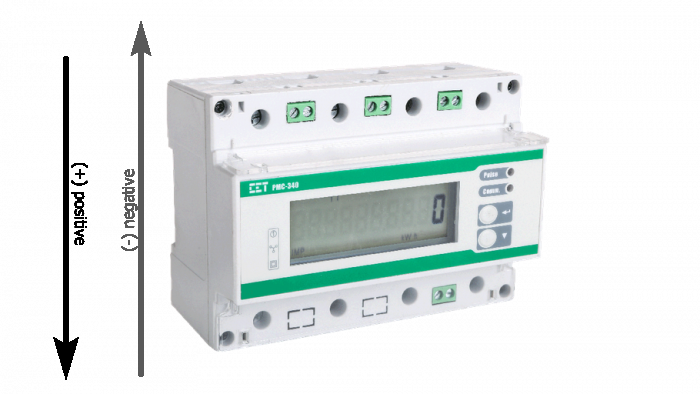
- When the current is flowing from the top of the device to the bottom of the device, the reading will be positive
- Vice versa
Using these two simple inputs, the CETA device will provide the following parameters on the following table.
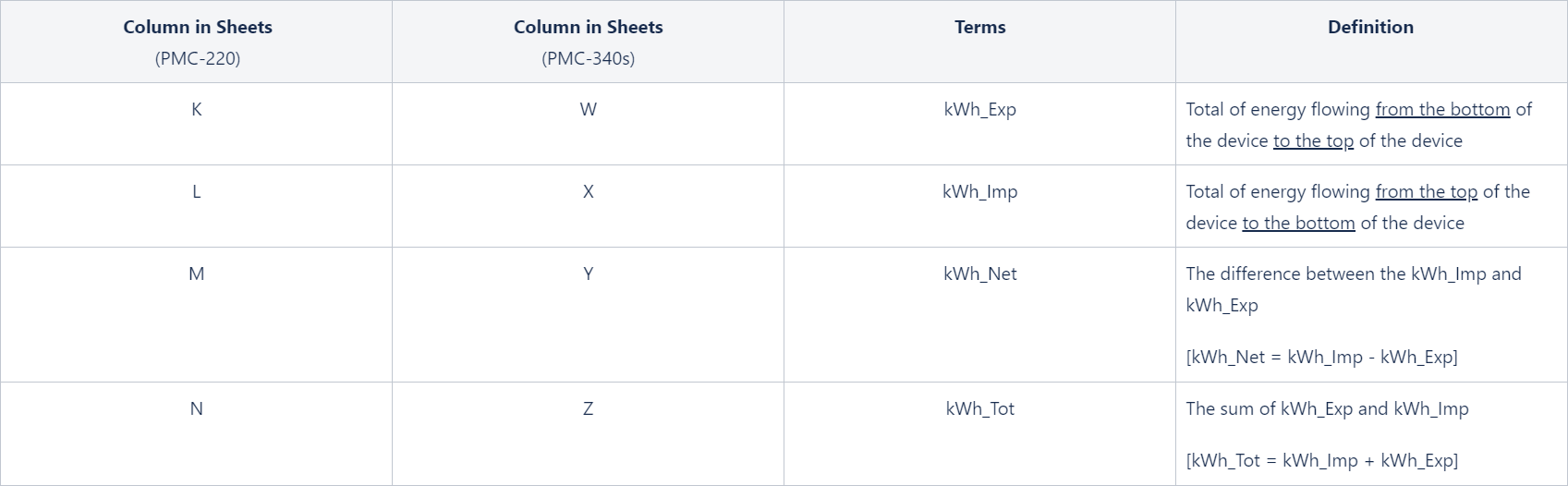
A reminder that the energy readings from the CET Meter are off by the factor of 100.
The energy readings need to be divided by 100 in order for us to get the correct results.
Case Study
Section titled “Case Study”Solar Production PPA
Section titled “Solar Production PPA”Let’s use May 2020 from the site ID 9999: Modbus Solar Generation only as an example.
The site is configured to monitor Solar Production PPA only. Please find the data for this site attached.
The correct installation is when we have cables from the Solar PV system on the top of the device and the MSB is connected on the bottom of the device, hence, the Solar Production will be recorded as positive kWh_Imp.
It implies that we only need to focus on kWh_Imp (Column L).
Using the data
Section titled “Using the data”To generate a Solar Production PPA invoice, technically you will only need two data points:
- The kWh_Imp on the start of the billing cycle
- The kWh_Imp of the end of the billing cycle
Example
Section titled “Example”- Billing cycle start date: the 1st day of the month
- Billing cycle end date: the last day of the month
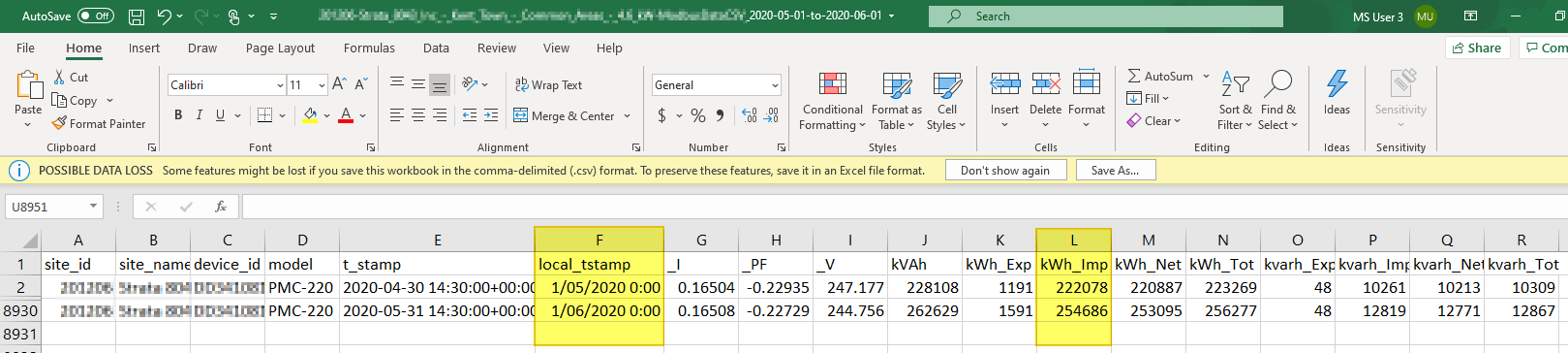
Please refer to the screenshot of May 2020 from the site ID 9999: Modbus Solar Generation.
The formula for the Invoiced Solar Generation data:
Invoiced Solar Generation = Solar Generation data on the start date of the billing cycle - Solar Generation data on the end date the billing cycle
Therefore, in this case:
- Billing cycle start date = 2020/05/01
- Billing cycle end date = 2020/05/31
- Solar Generation data on the 1st day of the billing cycle = 222078
- Solar Generation data on the last day of the billing cycle = 254686
Putting it together:
Invoiced Solar Generation = (254686 - 222078) / 100 kWh = 326.08 kWh
- A REMINDERthat this approach only works when the device is configured correctly!
- Assuming that the configuration of the device has been confirmed by the Install Check Tool, any data points where the _I > 0 and the _PF > 0 should be considered as a valid Solar Generation data. The negative _PF during non-production hours can be ignored as they are just noise.
- A similar approach can still be applied when the device is configured with incorrect polarity, however, you will need to process the kWh_Exp data instead of kWh_Imp data. The _PF of the PMC CETA devices that has an incorrect polarity will be negative, hence, you will need to look for data where _I > 0 and the _PF < 0.
-
How to calculate monthly invoiced energy consumption, and invoiced energy export, from the CETA meter data?
In short, you will 2 NMI Bundles to make it happen.
With Modbus, we are going to install 2 units as well,
- 1 to capture the Solar Generation
- 1 to capture the Net Consumption (need a second device to measure the Net Consumption)
IF Net Consumption > 0 then Energy Imported from the Grid
- Solar Consumed on Site = Solar Generation
- Energy Exported to the Grid = 0
- Energy Imported from the Grid = Net Consumption
IF Net Consumption < 0 thenEnergy Exported to the Grid
- Solar Consumed on Site = Solar Generation + Net Consumption
- Energy Exported to the Grid = Net Consumption
-
9999-Modbus_Solar_Generation-ModbusDataCSV_2020-05-01-to-2020-06-01.csv