

Unknown charges from Solar Analytics
If you notice unknown credit card charges from Solar Analytics, it is most likely something to with the subscription. The article aims to teach you to track which site that you are just being charged for.
Let’s use the following case study as an example.
Hi Support,
We don’t know which site it relates to, we have many government sites, all with 5 year subscriptions which are not yet due.
We have had two debits made to our Amex account for $200.00. One on 13 Aug 2019 and now one on 14 Aug 2020.
We also have had 20.00 debited to our Westpac account on 4 May 2020, 3 Jun 2020 and 3 Jul 2020, 3 Aug 2020.
We will be requesting a charge-back from our banking institutions for these amounts as they are not authorised.
Regards,Admin
If you are facing a similar situation as the example given above, please try the following steps to get the bottom of it yourselves!
-
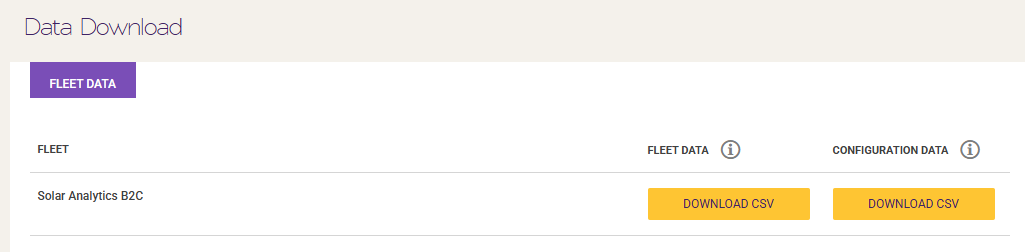
Go to the Data Download section on the Solar Analytics dashboard, and Download the CSV for the ‘FLEET DATA’
-
Open the file on a spreadsheet application of your choice.
-
There are many columns on the spreadsheet, however, we only need to focus on column A (Site ID), B (Site Name), K (Site Type), M (Current Subscription Type), O (Current Subscription Type Length (days)), P (SA Next Renewal Date), and Q (SA Subscription Status)
-
Let us assess the message one-by-one:
-
“Two debits made to our Amex account for $200.00. One on 13 Aug 2019 and now one on 14 Aug 2020”
This tells that we are dealing with a recurring annual subscription of a large site that has more than 2 devices which renewal date is around 13th or 14 of August. (Refer to the yellow highlights on the next step.)
-
“20.00 debited to our Westpac account on 4 May 2020, 3 Jun 2020 and 3 Jul 2020, 3 Aug 2020”
This tells us that we are dealing with a recurring monthly subscription of a large site that has more than 2 devices which renewal date is around the 3rd of 4th. (Refer to the green highlights on the next step.)
-
-
Please refer to the screenshot of the spreadsheet below.
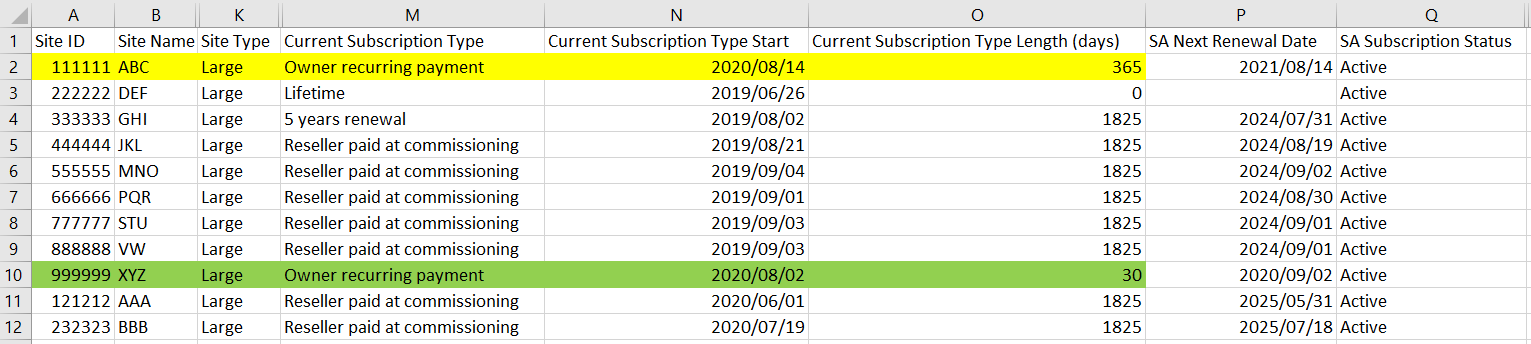
Now, we know that the charges are for site ID 111111 and site ID 999999.
Ideally, this happens as you are paying the subscription on behalf of the Site Owner. To prevent this happening again in the future, you will need to ask the Site Owner to either put in their credit card or to purchase a subscription from Solar Analytics.
The sample file can be downloaded below.
Let us know if you have any questions by clicking the ‘Contact Us’ button below.