

Goodwe & GE Solar with Solar Analytics - Site Registration
Introduction
Section titled “Introduction”Integrated Solar Analyticsoffers Solar Analytics’ solar management dashboard integrated with Goodwe / GE Solar residential inverters.
For optimal functionality and to ensure compatibility, please note the following requirements:
-
Currently, Integrated Solar Analytics - Goodwe/ GE Solar supports all inverters from the year of launch in 2018.
- Older inverters may work if they are WiFi connected and communicating with the Goodwe / GE Solar SEMS portal
-
Consumption monitoring will only work for hybrid inverters with a consumption meter attached or if a HomeKit device is connected. Without this, the customer will only see production data and experience a limited feature set.
Site Registration Prerequisites
Section titled “Site Registration Prerequisites”Fleet account set-up
Section titled “Fleet account set-up”To establish inverter integrated monitoring, you will need installer access to the Goodwe dashboard (SEMS portal) / GE Solar dashboard (GE Solar portal ) and a Solar Analytics Fleet account.
Please contact Solar Analytics support for the Solar Analytics fleet account by submitting a form via Contact us.
Installation requirements
Section titled “Installation requirements”For optimal functionality and to ensure compatibility, please note the following requirements:
-
Currently, Integrated Solar Analytics - Goodwe/GE Solarsupports all invertersfrom the year of launch in 2018.
- Older inverters may still work if they have a reliable Wi-Fi connection and can be seen transmitting data to SEMS portal
-
Consumption monitoring is supported for all hybrid inverters with a consumption CT and for all grid-tie inverters with a Homekit device. If you do not have one of these, the owner will only see production data on Solar Analytics and experience a limited feature set
-
It is the owners’ responsibility to maintain a functional internet connection to the inverter. Resellers need to ensure owners understand this responsibility and/or support them in ensuring connection.
-
Temporary commissioning of sites on SEMS/GE Solar portal (e.g. via installer hotspot) is not permitted and will be rejected by Solar Analytics.
-
Please commission the inverter and hardware on SEMS/GE Solar Portal with all the details.
Currently, our service does not support:
Section titled “Currently, our service does not support:”- Grid-tie inverters with only export limiting CT (production only experience is seen)
- Mixed Goodwe/GE Solar & other inverter brands
- Mixed Goodwe & Solar Analytics Classic solution
- AC-coupled batteries set-up
- Mixed Hybrid and Grid-tie Inverters on one site & multiple hybrid inverters on one site
Site Registration for Goodwe / GE Solar inverters
Section titled “Site Registration for Goodwe / GE Solar inverters”Please follow the steps below to commission the site on the Solar Analytics dashboard.
Important Notes:
Solar Analytics Integrated is currently available for GoodWe & GE Solar both grid-tie and hybrid inverters.
To display consumption data you must have a consumption CT installed on a hybrid inverter or a HomeKit installed for a grid-tie inverter. Otherwise, the customer will only see production data and experience a limited feature set.
-
Ensure all inverters are online during the process of commissioning.
-
Please ensure the customer email is set as the “Owner” in the SEMS portal. This will become the email of the site owner in Solar Analytics.
-
If you are an Owner attempting to share the plant, please make sure you have access to sharing for Step 1. If you do not have the right access, please reach out to your installer to upgrade your account access or ask your installer to do the sharing on your behalf.
Steps:
-
The customer clicks the “Add” button for Solar Analytics on the Goodwe SEMS portal / GE Solar Portal or mobile App
-
Or the installer does it on their behalf
Desktop View: Go to Management and click on the plant

Mobile App View: Click on the plant and go to the Edit icon
-
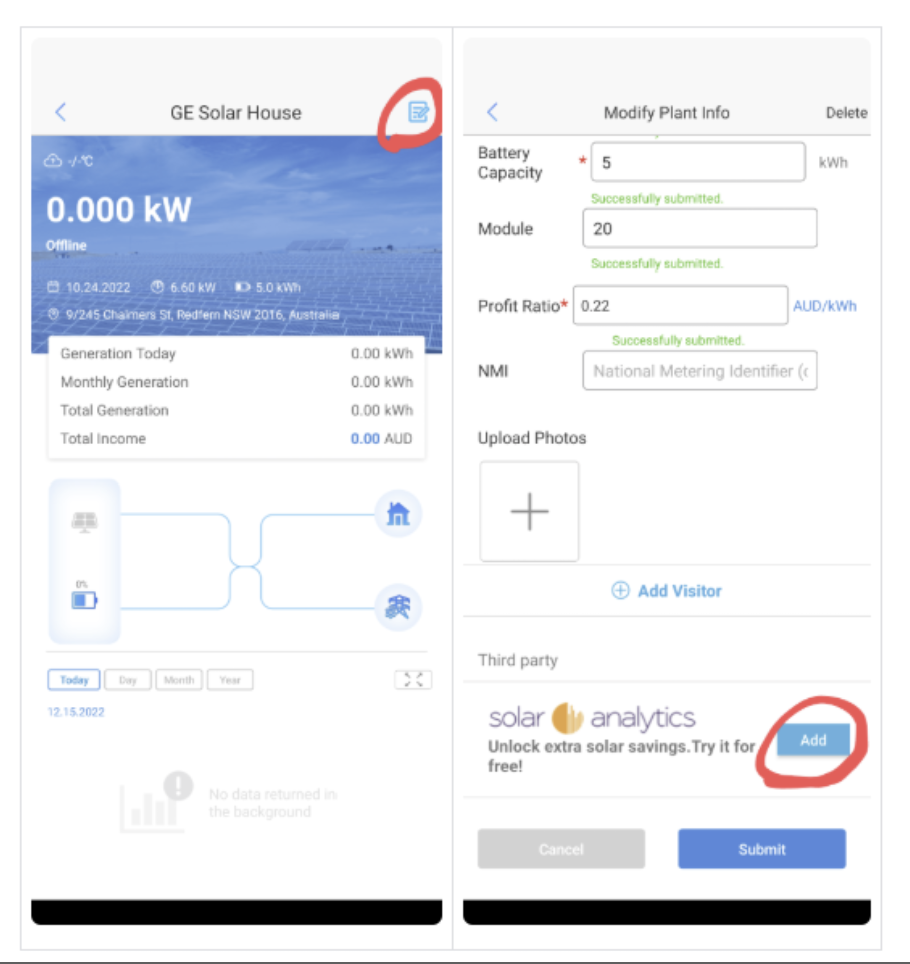
-
-
The commissioning process can take up to 10 minutes to complete
-
The customer will then receive the standard “login” email to Solar Analytics
- If the customer does not login, they will receive a second emailprompting to activate trial (part of the standard Free Trial onboarding)
-
The customer is now a standard 30-day free trial owner, and will receive the following:
-
In dashboard onboarding
-
Email onboarding
-
Email reminders to subscribe before the 30-day free trial is up.
- Note: 30 day free trial is only available when customer registers on their own through our website
-
-
The site will be assigned to your retailer fleet automatically if you fit the following criteria:
- You have a Goodwe installer account and the installer account email domain matches your Solar Analytics email domain
- You have contacted Solar Analytics and told them you would like your Goodwe installer email and Solar Analytics fleet email linked manually (if they have different domain names)
Please note that the Welcome Email will be sent to the owners Goodwe Login Email. If you wish to use a different email please reach out by clicking the Contact Us button below.
Site sharing - troubleshooting steps for Installers with access to Fleet Dashboard
Section titled “Site sharing - troubleshooting steps for Installers with access to Fleet Dashboard”In case you get an error while entering the inverter serial number to find a site match, please follow the guidelines to troubleshoot the issue. The following notes below will be relevant for Installers who share on behalf of their customers and for registration on the dashboard.
No site match:
Section titled “No site match:”The above message appears if we could not find any site match for the inverter serial number you have entered. Please wait at least 5 min after site sharing for the site match.
- Please check the serial number entered.
- Please ensure this inverter is configured in Goodwe/GE Solar dashboard - SEMS portal / GE Solar portal . Ensure the inverter is connected to WiFi and online before sharing the site with us.
- Please confirm if the plant is shared with the correct email ID: goodwe@solaranalytics.com (same email ID for GE Solar)
- If you are commissioning a site monitored by a Solar Analytics Smart Solar Monitor device, please select “Classic” as the Hardware Type on Step - 0 of the site registration.
Unsupported Inverter model:
Section titled “Unsupported Inverter model:”The above message appears if the site is shared an inverter Solar Analytics does not support or recognise.
- Currently, Integrated Solar Analytics - Goodwe/GE Solarsupports all invertersfrom the year of launch in 2018.
However, in case you get an error message with a recent inverter model you have isntalled, please contact Solar Analytics support through contact us and request to update the inverter information on our system. Please quote the make and model of the inverter in your enquiry.
Mix of online/offline Inverters
Section titled “Mix of online/offline Inverters”Solar Analytics integration does not support when the site is shared with a mix of online and offline inverters.
- Please ensure all the inverters are online and connected to the internet when sharing the site with us.
Inverter serial number already taken
Section titled “Inverter serial number already taken”In case if you get the above message, then follow the steps below,
- The inverter may be partially commissioned. Please search for the site in the pending sites list on the Solar Analytics fleet with the site name, and continue with the site registration.
- The inverter may be fully commissioned. Please check the site on the active list.
- If you could not find the site either on your pending or active list, please contact Solar Analytics support through contact us.
Multiple Hybrid inverters - Mix of Hybrid & Grid-tie inverters
Section titled “Multiple Hybrid inverters - Mix of Hybrid & Grid-tie inverters”Currently, we do not support this setup. However, we are always looking for opportunities to improve our capabilities. If you would like to collaborate with us to implement support for your site, please contact Solar Analytics product management at product@solaranalytics.com.
Additional note:
Section titled “Additional note:”While sharing site from SEMS portal, please wait for a couple of seconds for the “Add” button to appear under the Third Party Section. SEMS portal takes time to load.
Can’t find what you’re looking for? View all Goodwe / GE Solar support pages here.